The roar of the crowd, the perfectly manicured pitch, and the pride of representing a nation on the world’s biggest stage—nothing beats the atmosphere of a World Cup. As football fans eagerly await the massive tournament co-hosted by the United States, Mexico, and Canada, mobile gamers are preparing to replicate that excitement on their phones.
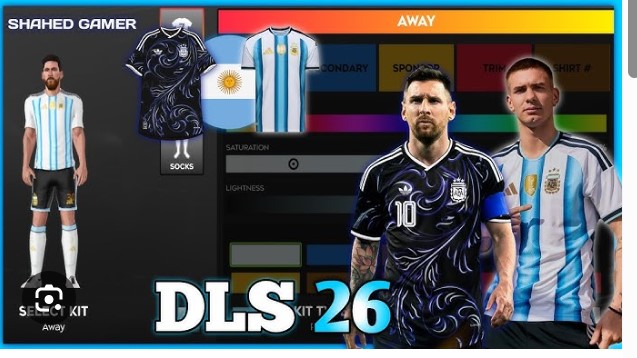
Dream League Soccer (DLS) remains one of the most engaging mobile football experiences because it allows for total customization. You aren’t just stuck with generic uniforms; you can import authentic designs to make your team look like the real deal. With the 2026 tournament approaching, the demand for high-quality DLS 26 World Cup kits is skyrocketing.
Whether you want to lead Brazil to another title, help England bring it home, or take an underdog like Canada to the finals, having the right look is essential. This guide explores everything you need to know about finding, importing, and rocking the best World Cup kits in Dream League Soccer 2026.
Why Custom Kits Matter in DLS
Authenticity is the heart of any sports simulation. While Dream League Soccer provides a fantastic gameplay loop of building a team from scratch, the default kits can feel a bit lackluster after a few seasons. Custom kits bridge the gap between a casual mobile game and an immersive football management experience.
The 2026 Aesthetic
The 2026 World Cup is set to be unique. It is the first tournament featuring 48 teams, meaning there will be more nations and more jersey designs than ever before. Brands like Nike, Adidas, and Puma will likely push the boundaries of design, blending modern textile technology with cultural homages.
By importing these specific kits into DLS 26, you capture the visual identity of the tournament. When you score a last-minute winner with Messi or Mbappé, seeing them in their accurate national strip adds a layer of satisfaction that a generic kit simply cannot match.
How DLS Kits Work
Before you start hunting for URLs, it is helpful to understand the technical requirements. Dream League Soccer uses a specific format for its custom assets to ensure they wrap correctly around the player models.
The 512×512 Standard
For a kit to look crisp and load correctly in the game, the image file must be a PNG with a resolution of 512×512 pixels. If the image is too large, the game might reject it or crash. If it is too small or low-quality, your players will look pixelated and blurry during match play.
The Components of a Kit
A full DLS kit template is a flat image that contains several distinct sections:
- The Shirt: Front and back designs, including sponsor logos and crests.
- The Shorts: Usually color-coordinated with the shirt.
- The Socks: Often the place for subtle manufacturer branding.
- Sleeves and Collar: These details wrap around the player’s arms and neck.
When you find a “DLS 26 World Cup Kit,” you are essentially looking for a direct link (URL) to an image hosted on the internet that follows this specific template.
How to Import World Cup Kits into DLS 26
The process of importing kits has remained relatively consistent across different versions of Dream League Soccer. Assuming DLS 26 follows the successful interface of its predecessors, here is the step-by-step method to update your team’s look.
Step 1: Find Your URL
Browse reputable DLS community sites or image hosting repositories to find the kit you want. You need the direct link to the image file. The URL must end in .png or .jpg (though PNG is preferred for transparency).
Step 2: Access the Customization Menu
Launch Dream League Soccer on your device. Navigate to the “My Club” section on the main menu. From there, select “Customise Team.”
Step 3: Edit Kit
Tap on the “Edit Kit” button. You will see your current home, away, and third kits. Select the slot you wish to overwrite (e.g., if you are importing a France Home Jersey, select your Home kit slot).
Step 4: Enter the Link
Tap the “Custom Kit” or “Download” button in the bottom corner. A text box will appear. Paste the URL you copied in Step 1 into this box.
Step 5: Confirm and Save
Hit the confirm button. The game will download the image data. If successful, you will see your player wearing the new 2026 World Cup kit immediately. Don’t forget to save your changes before exiting the menu.
Anticipated Designs for 2026
While official designs are typically kept under wraps until a few months before the tournament kickoff, kit creators and concept artists often release “prediction kits” or fantasy concepts well in advance. These are perfect for DLS players who want to refresh their team’s look early.
The Host Nations
Expect the United States, Mexico, and Canada to have standout designs.
- USA: Nike usually opts for a classic white home jersey, but the away kits often feature bold patterns or street-style aesthetics.
- Mexico: Adidas consistently produces some of the most beautiful kits for El Tri, often incorporating Aztec patterns or deep green hues.
- Canada: As a co-host, look for Nike to elevate Canada’s kit beyond the templates used in 2022, focusing on the maple leaf and red-and-white motifs.
The European Powerhouses
European kits tend to balance heritage with modern minimalism.
- France: The deep “Les Bleus” blue with gold accents is a staple.
- Germany: The classic white shirt with black details is iconic, often featuring geometric patterns representing the DFB eagle.
- England: Expect a clean white home shirt, but the excitement is usually in the away kit, which has ranged from red to navy to light blue in recent years.
Troubleshooting Common Issues
Sometimes the import process doesn’t go smoothly. Here are common problems players face when importing DLS 26 kits and how to fix them.
“Image Download Failed”
This is the most common error. It usually means the URL is broken, or the hosting site does not allow direct hotlinking. Ensure you are copying the direct link to the image, not the link to the webpage the image is on.
Pixelated or Blurry Kits
If your kit looks great in the preview but terrible on the pitch, the source image might be low resolution. Always look for “HD DLS Kits” or verify that the source image is truly 512×512 pixels.
White Backgrounds
Authentic DLS kits use transparent backgrounds so that only the jersey fabric shows up. If your player looks like they are wearing a white box, you likely downloaded a JPG instead of a PNG with transparency. Look for a better file source.
Mastering Your Team’s Identity
Upgrading your visuals with DLS 26 World Cup kits is about more than just aesthetics; it is about building a club identity. Whether you are recreating the Argentinian national team or building a fantasy “World XI” squad, these kits ground your gameplay in reality. As the tournament draws closer, the community will flood with high-quality replicas. Keep your eyes peeled, update your links, and lead your team to glory in style.