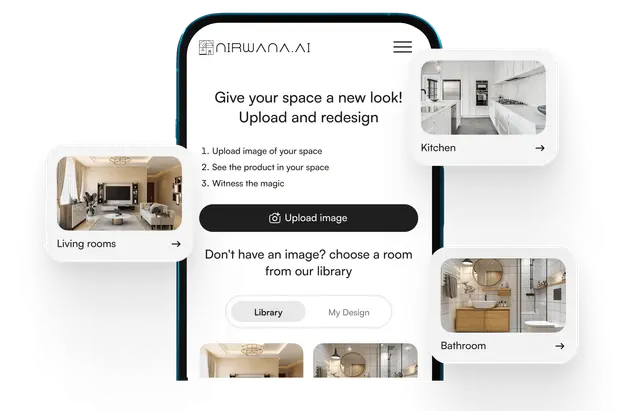
When it comes to planning a home makeover, tiles often become one of the biggest design dilemmas. Colours that looked perfect in the store suddenly feel too loud at home. Patterns that seemed subtle may appear dull on your walls. This is exactly why modern homeowners are turning to advanced digital tools—and yes, using a tile visualizer in the first stage of your design journey can completely transform the way you plan, imagine, and finalize your interiors.
Why Choosing the Right Tiles Is So Challenging for Homeowners
Tiles set the tone for your space. They affect the mood, lighting, style, and even how large or small a room feels. Yet, selecting them is often overwhelming because:
- Stores display limited combinations.
- Home lighting differs from showroom lighting.
- Samples don’t fully represent real-world scale.
- Visualizing entire walls or floors from a small tile piece is nearly impossible.
A wrong tile choice can impact your space—and your budget—for years. That’s where digital visualization comes in as a game-changer.
How a Tile Visualizer Makes Decision-Making Easier
A smart visualization tool allows you to preview how different tiles will look in your space before you purchase them. It eliminates guesswork and gives homeowners clarity by presenting realistic previews of various tile combinations.
1. Real-Time Room Simulations
Upload a room picture or choose from pre-designed room templates to see:
- Floor tiles
- Wall tiles
- Accent tiles
- Backsplash designs
- Outdoor tile options
With a few clicks, you can swap colours, patterns, and sizes.
2. True-to-Scale Representation
Tiles often look perfect in your hand but overwhelming when applied to a full room.
Visualization tools scale tiles accurately, giving you a life-like preview of:
- Pattern size
- Tile orientation
- Grout visibility
- Overall coverage
3. Experiment With Unlimited Combinations
No salesperson rushing you.
No cluttered samples.
Just endless creativity.
You can mix and match:
- Marble tiles with wood patterns
- Matte finishes with glossy surfaces
- Large-format tiles with mosaics
Benefits of Using Digital Tile Visualization for Renovations
1. Saves Time & Reduces Stress
Instead of visiting multiple showrooms, you explore possibilities from your laptop or phone. This makes decision-making faster and more convenient.
2. Eliminates Costly Mistakes
Wrong colour? Wrong pattern? Wrong grout shade?
A visualization tool helps you avoid expensive post-installation regrets.
3. Helps You Communicate with Contractors
Sharing your visualized design with tilers, architects, or designers ensures everyone understands your exact expectations.
4. Boosts Confidence
When you see the final look before installation, it becomes easier to make design commitments.
Top Features That Make a Tile Visualizer Irresistibly Useful
Modern visualization tools come packed with smart functionality that turns every homeowner into a confident designer.
1. Upload Your Own Room Photo
This feature is loved by homeowners because it provides personalized and realistic previews.
You get to see how your actual room will look—lighting, shadows, décor, and all.
2. AI-Powered Auto Mapping
AI detects walls, floors, corners, and edges automatically, saving time and reducing manual adjustments.
3. Tile Size & Pattern Orientation
Rotate tiles: horizontal, vertical, diagonal, or herringbone.
Resize tiles and observe how layouts change the room’s visual width or height.
4. Colour Matching Tools
Great for finding combinations that complement:
- Your furniture
- Curtains
- Paint colours
- Countertops
5. Before–After Comparison
A quick side-by-side view helps homeowners evaluate multiple style options with clarity.
Why Homeowners Love Using a Tile Visualizer for Kitchens & Bathrooms
Spaces like kitchens and bathrooms need tiles that endure moisture, stains, and daily wear. Visualization tools make choosing these tiles easier and practical.
Kitchen Benefits
- Test multiple backsplash styles
- Compare floor tiles with cabinet colours
- See how lighting reflects on glossy tiles
- Avoid mismatched countertops and tiles
Bathroom Benefits
- Try different shower wall patterns
- Preview how darker tiles impact brightness
- Mix accent borders, niches, and feature walls
- Ensure tiles match hardware and fittings
How Tile Visualization Enhances Design Creativity
1. Encourages Bold Choices
Most homeowners avoid bold tiles because they fear the outcome.
But when you see bold designs in a realistic preview, you gain the confidence to try something unique.
2. Helps You Compare Multiple Themes
Try themes like:
- Minimalist
- Vintage
- Rustic
- Marble luxe
- Industrial grey
- Tropical and vibrant
3. Supports Budget Planning
Previewing different tile ranges—premium vs. simple—helps you understand what fits your budget without compromising on style.
Using a Tile Visualizer to Plan Colour Harmony and Texture
Tiles come in a wide variety of:
- Textures
- Finishes
- Shades
- Patterns
A visualization tool makes it easier to judge how these elements work together.
Texture Benefits
Use the tool to see how matte tiles absorb light or glossy tiles reflect it.
This helps you understand which finish enhances room brightness.
Pattern Harmony
Previewing patterns ensures they don’t clash with:
- Curtains
- Furniture
- Rugs
- Wall decor
Lighting Considerations
Tiles can look different under warm vs. cool lighting.
Visualization previews help you avoid surprise colour shifts after installation.
Common Mistakes Homeowners Avoid with Visualization Tools
1. Choosing Tiles Based Only on Store Lighting
Showrooms use bright, unnatural lighting that makes colours appear different.
Visualization tools simulate more realistic home lighting.
2. Ignoring Grout Colour
Grout can dramatically affect tile appearance.
You can now test grout shades digitally before finalizing.
3. Misjudging Tile Size
Large tiles can make a small room look bigger—or sometimes too empty.
The tool helps you visualize scale properly.
4. Overlooking Accent Walls
Digital previews show you exactly how accent tiles transform a space.
Future Trends: What’s Next for the Tile Visualizer Experience?
Visualization technology keeps evolving. Home design is becoming more interactive and precise with each innovation.
1. AR-Based Walkthroughs
Imagine pointing your phone at your living room and seeing tiles appear instantly.
Augmented Reality is making this a reality.
2. Hyper-Realistic Rendering
Sharper visuals, accurate shadows, and photo-like quality will make previews almost indistinguishable from real installations.
3. Voice-Based Design Assistance
Speak your requirements, and the AI will display suggestions instantly.
4. Material Combination Suggestions
Tools will start recommending tile–paint–furniture combinations automatically.
FAQs – Everything Homeowners Ask About Tile Visualization
1. Are tile visualizers accurate?
Yes. They provide highly realistic previews, especially when you upload photos of your own room.
2. Do I need design experience to use one?
Not at all. These tools are created for everyday homeowners and feature simple, user-friendly interfaces.
3. Can I use a tile visualizer for outdoor spaces?
Absolutely. Many tools offer patio, balcony, parking, and garden tile simulations.
4. Are visualizer previews helpful for architects and contractors?
Yes—they ensure everyone involved in the project has the same design vision.
5. Can I save and share my designs?
Most tools allow exporting or sharing visuals through email, WhatsApp, or downloadable images.
Final Thoughts
Making design decisions for your home doesn’t have to feel like a gamble. With a tile visualizer, you gain clarity, confidence, and creative freedom—all before a single tile touches the floor. Whether you’re renovating a small bathroom or designing a luxurious living room, these digital previews help you craft beautiful, functional spaces that feel just right. And as visualization technology continues to advance, homeowners can look forward to even smarter, more intuitive tools that make the design journey effortless and exciting.