Introduction
Imagine this: You need to approve a $50,000 purchase order but before you can sign off on it, you’re procurement manager is spinning his wheels trying to figure out where in your three systems the certificate of insurance from a supplier sits. Meanwhile, your HR director is knee-deep in filing cabinets hunting down an employee’s signed non-compete agreement because the legal team needs it for something by noon. Down in sales, somebody just said, “Does anyone remember where we put the Johnson account agreement?”
Sound familiar? You’re not alone.
In the traditional business scenario, documents exist in one world (shared drives, e-mail attachments, the desktop folder titled “Important Stuff”) and transactional data exists in another (the ERP system). So this creates human integrators among your employees, they will switch contexts continuously, have to connect the muddy dots between pieces of information manually. Who is this customer? Check the CRM. What was their last order? Jump into the ERP. Where’s their signed contract? Begin searching through that network drive and pray someone had named it properly.
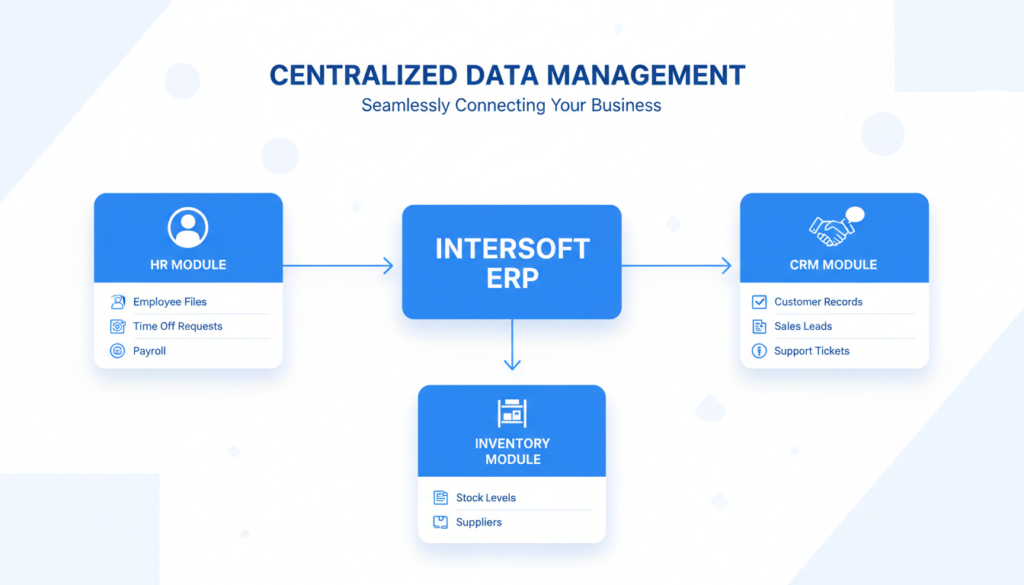
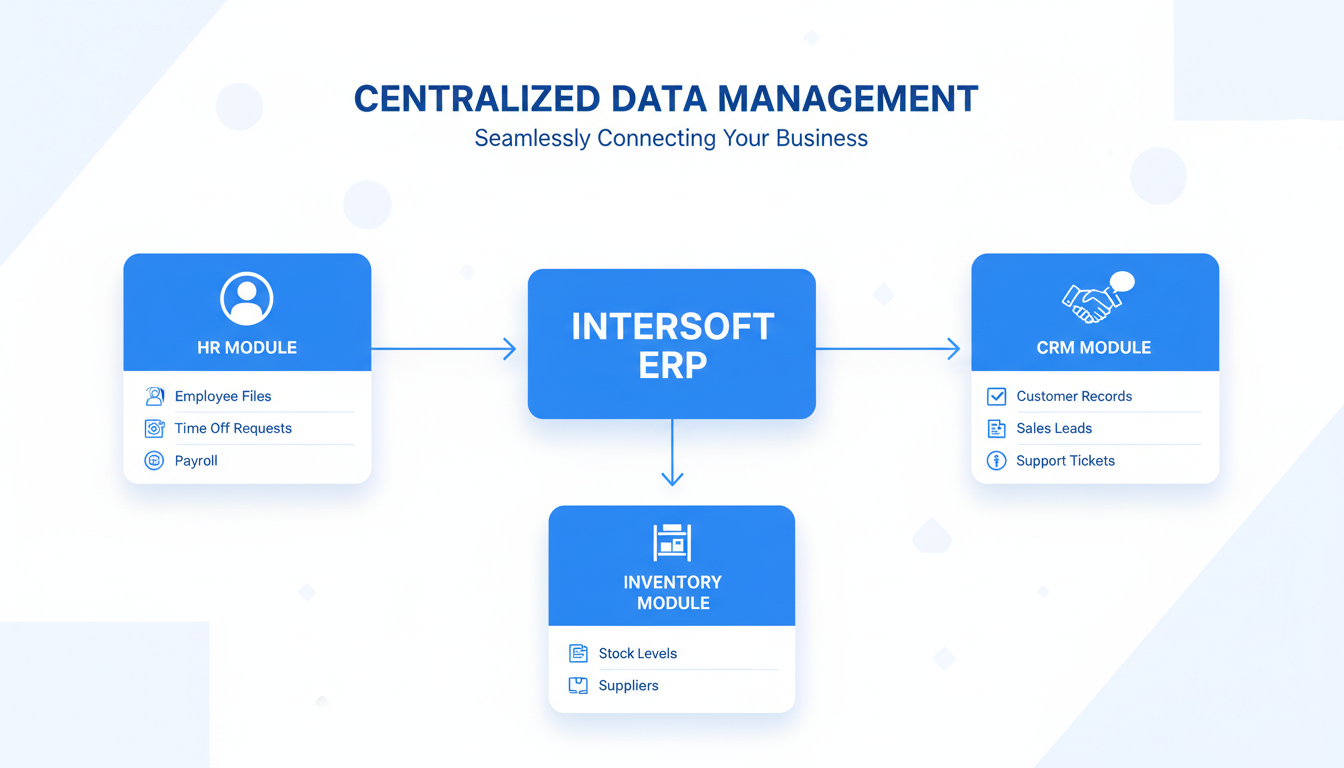
We’ll take a closer look at three of the most important ERP modules where linking documents can have a deep impact on how your business runs and why it should be the solution you’ve been waiting for.
Connecting with HR: Securing the Full Employee Lifecycle
Documentation is the lifeblood of HR departments. We’re discussing resumes, background checks, offer letters, I-9 forms, W-4s, direct deposit authorizations, performance reviews and disciplinary actions; benefit enrollment forms and promotion letters to the next level of business; termination paperwork in between. The list goes on and on.
The Disconnected Reality: A Filing Nightmare
Here’s how most companies are experiencing it: Employee files are stored in locked filing cabinets, password protected folders on the shared drive and individual manager desktops. You can find some files in the HRIS, some are in an email thread, and what about those couple of really important ones? No one knows quite where those went after the last move between offices.
There’s audit season and everything is absolutely insane. You’re pulling people off their regular job” to do document-hunting. You just hope nothing was misfiled or inadvertently deleted. And you’re hoping that the file of that former employee is really complete because the Department of Labor has just asked for it.
Hiring new employees is reduced to a paper chase. You’re e-mailing forms back and forth, printing things out to sign them and scanning them back in, and then trying to decide on where to stash the documents. By the time someone starts their first day, you’ve touched the same piece of paper five or six times.
The Benefit of Linking: One Employee, One Complete Record
Imagine when those records are actually linked to documents in each employees Employee Master Record which reside in your ERPs. In practice, this is how it works:
Onboarding Automation That Actually Works: Picture yourself effortlessly creating a digital offer package through the system, and then sending it off to your new hire. They read the doc, e-sign it, and boom- right to their employee record it goes upon submission. No manual filing. No more wondering if you saved it right. No “Can you resend that? I can’t locate it” emails three months down the line.
The hiring manager can view the onboarding status in real time and what specific forms have been filled and are yet to be filled. IT is notified to set up accounts. Facilities doesn’t need to be told an office must be set up. We’re all working off the same information at that moment.
Compliance at a Click: Suppose you receive an I-9 audit notice. If the system were disconnected, you’d be scrambling and pulling files for days, if not longer, making copies all the time hoping to God everything is in there. With linked records, you open the employee record and have immediate access to all verified documents associated with the individual. The I-9, the IDs that back it up, the dates, verifications, it’s all right there.
The Bottom Line for HR
This is how you build a safe, legal and truly effective HR operation. It protects your company from a legal perspective, makes audits less scary, and creates a much better employee experience. Your HR people go from file clerks to strategic partners in forming your workforce.
And when an employee parts from the company, and you need to manage their final paperwork, offboarding checklists, and exit interviews, all of it is recorded and tracked in one place. Nothing left hanging, nothing forgotten.
Linking to the CRM Module: 360 View of Your Customers
There are paper trails at every step of the sales and services process: initial inquiry emails, qualifying notes, quotes, proposals and contracts, NDAs, change orders and more all the way across to correspondence at scale (eg support tickets) as well as complaint resolutions.
The Disconnected Reality: Everyone’s Flying Blind
Here’s the reality at most companies that unfolds every singe day: Sales stored signed contracts in a shared drive (potentially organized by year, maybe by rep, maybe by whoever felt like creating folders that day). Support tickets live in a ticketing system that no one but us has access to. Accounting module contains invoices and payment history. There are marketing emails in the CRM, but they aren’t associated with anything.
A sales rep is about to make a renewal phone call and they want to read up on the history of the relationship. They can see they did a deal two years ago, but what came of that? Were there service issues? Did the customer grow usage? Have they been happy? The rep basically has to go in blind, praying that the customer doesn’t mention anything about which they should already be aware.
The Value of Connecting: Every Customer Story in One Spot
By having all customer-facing documents related to the main CRM records for customers or contacts, you form a 360-degree view, as we like to call it. Here’s what that means in the face of actual situations:
Sales Acceleration With Perfect Context: Imagine your sales rep is just about to call a prospect that’s ready for a trial of your product after making one purchase. They look up the customer record where they can instantly find every previous proposal, the original contract with all its terms, email exchanges, our notes from meetings and even that custom pricing exception your boss gave us last year.
With this knowledge, they can enjoy an informed personal conversation. “It looks like you’ve had our Standard offer for 18 months. Here are a few that you might find useful based on your order history.” This is not sales talk but consultative selling with a real history there.
Or the rep can view whether the customer recently experienced a support issue and how it was handled. That is powerful information that can avert overly personal conversation and prove to the customer that you’re paying attention.
The Bottom Line for CRM
This consolidated view allows more meaningful and informed interactions with the customer. It shortens sales cycles due to fact that your staff isn’t wasting precious time looking for bits of information. It grows lifetime value of the customer with great service. And it makes each touchpoint, even sweet collages or biting designs, more professional and personalized.
When you do know them, your customers will notice. They also can tell when you don’t. That way, you are always ready to go.
Linking to the Inventory & Procurement Module: The Definitive Product and Order History
Every item has a story for product-based businesses. There are quotations from suppliers, purchase orders, quality control certificates, hazard data sheets, warranty details, specification books for parts and materials and even assembly instructions and maintenance records with failure reports and histories.
The Disconnected World: Information Scavenger Hunts
Let’s paint the typical picture: Safety data sheets are in a binder on the shop floor (assuming someone remembered to print them and nobody borrowed the binder). Warranty information came through in an email from the supplier six months ago. Purchase orders are in the ERP, but the supplier’s terms and conditions, insurance certificates, and quality agreements are filed in procurement’s shared folder.
When a customer asks, “Can you send me the spec sheet for part number XYZ?” someone has to go hunting. When a quality issue arises, finding the original supplier certificate becomes an urgent priority. When equipment breaks down, maintenance technicians are digging through manuals trying to figure out the right repair procedure.
The Bottom Line for Inventory and Purchasing
These two approaches combined help ensure regulatory compliance ( which is life or death in manufacturing, food, pharmaceuticals and many other regulated industries). It minimizes supply chain risk by providing you with full vendor and material history. Information is brought into operation in a fastest manner, which improves maintenance operations. And it accelerates response times for customer queries about specs and certifications.
Your ops team is more efficient. Your compliance risk drops dramatically. Your customers receive faster, more accurate replies.
The Intersoft ERP Difference: Native Links, Not Manual Labor
And here is the crucial thing to understand: with Intersoft ERP, you don’t do this by posting up documents and tagging them appropriately (and hoping everyone else does the same). They’re a core architectural concept designed in the way the system operates.
Automatic Linking: When you create an order from a customer, the system is already primed to link future related documents with both that order and that customer as soon as they are entered. A packing slip is created, it’s also automatically connected. The relationship is established when a bill of lading is issued. It’s hooked up when the invoice is sent. You’re not doing all of that extra work, the system manages such relationships intelligently.
Real Universal Search And More: You need to look up part number 12345? Search for it. The service will provide you with the item’s record and a complete transaction history, current stock, as well as all attached documents (supplier specifications, technical drawing(s), photograph(s), safety data sheet(s)/MSDS/OSHA/REACH directives etc., test certificates) in one integrated view.
That’s not three places that you need to search. You’re not just praying someone put it where you think it should be. It’s not as if you’re calling around and saying: Does anyone know where one is? It’s all right there.
Process-Enforced Compliance: And here’s an available option that gets even better, you can set the system to demand a certain document before an action can take place. For instance, you may create a requirement where a customer contract should be associated with a customer account before the sales order can become active.
This is how you bake compliance into your workflow. It’s not as if people can forget or bypass steps, the system doesn’t allow you to proceed until each part of the process is submitted. This is particularly useful in regulated business or businesses with rigorous approval cycles.
Audit Trail and Versioning: Everything an editor attached, edited or removed is being written in a history. Who did it, when they did it and what subsequently happened. This produces a full audit trail that’s priceless to maintain and use both for compliance, dispute resolution and security.
It’s the essentially, “Who authorized this change?” or \“When did this document get added?\” you have answers. And let’s say you want to know what a contract looked like before it was amended, history is tracked by version control.
Common Questions and Concerns
“This is not going to be a big project to actually do?”
It may, if you attempt to move all of your historical documents at once. Smart companies use a hybrid approach that pushes the ally-cookie user event data into their new system natively moving forward. They’re doing it piecemeal as the whim strikes them, or when they run out of space, or when accessing past records becomes necessary to handle some current transaction.
The trick is to make the new process function correctly so you’re not adding insult to injury going forward.
“What about security? I don’t want everyone reading sensitive papers.”
But that’s precisely why this process is more secure than shared drives. You have fine permissions at the module, record and even document level. HR files are kept narrow to HR positions. Financial documents require accounting access. Sales and Service can see customer contracts, but warehouse staff cannot.
Compare that with a shared drive where folder permissions are convoluted, limited and it is easy for something to be accidentally mis-configured.
What if the internet goes out? Can we still access documents?”
The modern ERP solutions such as Intersoft ERP provides cloud deployment with high production level uptime and redundancy measures. And many also provide offline or cached access so that important functions are never far out of reach. The reliability is usually better than that of local servers, which can crash and lose data.
And, not to mention that cloud systems automatically handle backups. Now, you never have to worry about losing your locally held files to hardware failure, fire, theft or other disasters.
Real Life Applications: What change in behaviour is the consequence this estimate?
Here’s what really changes for your day-to-day business:
Your teams quit squandering time hunting for the issue: Rather than let your team waste 15-30 minutes fighting to track down things, they spend 30 seconds. That adds up quickly, when multiplied across dozens of employees and hundreds of requests a week.
New personnel become productive more quickly: The learning curve becomes markedly shorter when employees are trained to use just one system with everything they need as opposed to five separate systems.
Audit and compliance are part of normal operations, not a fire drill: Some auditor says you must write and keep documentation forever; you do not stop all work for a week to prepare. You produce reports, yield records and deliver what’s demanded in an efficient manner.
Measurable customer service gets markedly better: Response times decline. First-call resolution rates increase. Customer satisfaction scores go up. Why? Because your team has the information they need to help people efficiently.
Better management decisions: When executives can access the full picture, not just the numbers, but also the supporting documentation and context – strategic planning improves. You are dealing with truth, not conspiracy theory.
Risk goes down the board: Legal risk, compliance risk, financial risk, operational risk, it all comes down when you’ve got full, transparent records you can access and audit.
Conclusion
Linking documents directly to ERP modules represents a fundamental shift in how businesses handle information. You’re moving from managing disparate pieces of information scattered across multiple systems to stewarding interconnected knowledge that tells complete stories.
For businesses seeking operational excellence, this deep integration isn’t just another technical feature to add to your requirements list. It’s a foundational capability that empowers your employees to do their best work, delights your customers with responsive and informed service, ensures compliance with regulatory requirements, and drives better decision-making at every level of your organization.
The question isn’t really whether you should integrate document management with your ERP modules. The question is: How much longer can you afford not to?
Your employees are already doing this work, manually connecting information, searching across systems, switching contexts constantly. By automating and integrating what they’re already doing, you’re not adding complexity. You’re removing it. You’re giving them back time to focus on work that actually matters instead of playing detective with your company’s own information.
That’s the real benefit. Not the tech, but what it lets your people do.